Wedding planning often comes down to a small question at an inconvenient moment. What should we tackle next? Have we allowed enough for this expense? Can we move someone to another table?
We’ve added Dove to Wedlock to help you work through those questions. Dove is an AI planning helper that uses relevant details saved in your wedding, so you can ask about the plan you’re already working on.
Open it from the sidebar, or choose Ask Dove beside a task, guest, expense or table. You can keep different questions in separate chats and return to them later.
Start with the thing you’re stuck on
You don’t need to write a detailed brief. A specific question about one part of your wedding is a useful place to begin.
If choosing a photographer feels like a big job, ask Dove to break it into smaller tasks. It can suggest steps for you to review and add to your checklist, while keeping the original task.
In Budget, you can ask about the costs you’ve recorded or request a new expense using an amount you provide. Dove doesn’t check live supplier prices or record payments for you, so confirm any quote with the supplier before using it in your plan.
For guests, it can suggest additions or updates when you ask, or help draft wording for an RSVP reminder. You review and send the message yourself. Dove doesn’t send messages or invitations.
Talk through a seating change
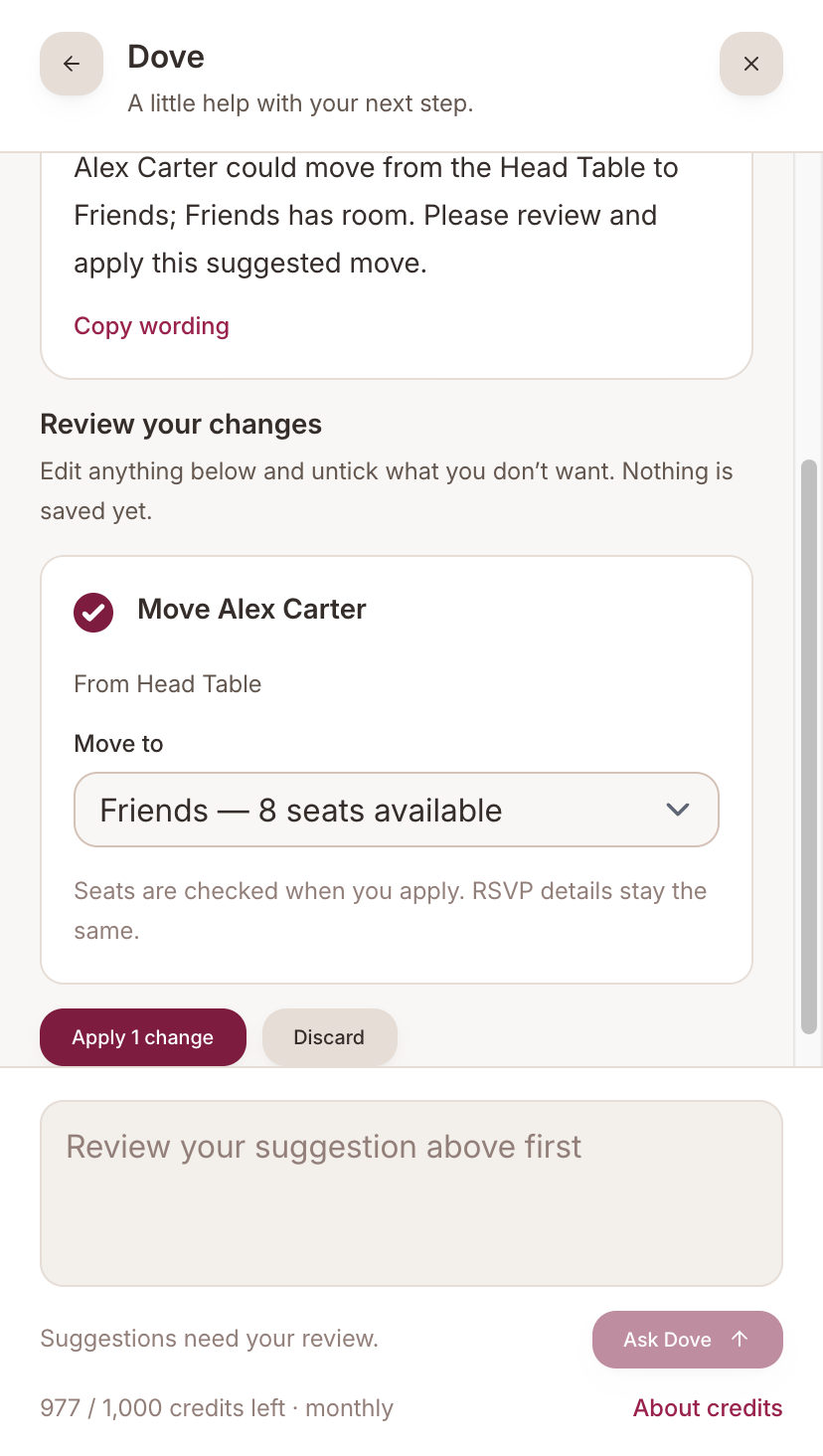
Seating is a good example of how Dove works with your saved plan. Open it beside a guest or table and ask about a move, such as moving a named guest to your Friends table.
Dove can suggest a move using your saved guests and tables. The review form shows the proposed destination, and Wedlock checks confirmed seat capacity when you apply the change. Moving someone doesn’t change their RSVP status.
You still need to tell Dove about preferences that aren’t in the plan. It won’t know that two guests would rather sit apart simply from their names.
Check the suggestion before saving it
When Dove suggests a change, it appears in a review form. Nothing is saved at that point.
Check the details, edit anything that needs adjusting and untick suggestions you don’t want. Then apply the changes you’ve chosen, or discard the suggestion. Undo is also available after applying a suggestion.
That review step applies to suggested tasks, expenses, guest details and seating moves. If you only want advice or draft wording, you can have the conversation without adding anything to your plan.
Like any AI helper, Dove can make mistakes. Check names, dates and amounts before saving a suggestion.
Try Dove with your free account
The Free plan includes a one-time allowance of 100 Dove credits per wedding. Complete includes 1,000 credits each month, shared across your wedding. Replies use credits, and your remaining allowance is shown in the app. Reviewing, applying, discarding and undoing suggestions don’t use credits.
You’ll need to verify your email before using Dove. When you ask a question, relevant saved wedding details are shared with our AI provider; saved guest email addresses and dietary requirements are excluded. Your chats are private to your Wedlock account.
All the usual planning tools are still there if you prefer to organise things yourself. Dove opens when you choose it.
Take a closer look at Dove, or create a free Wedlock account and try it with your own wedding plan.